Landing Pages
Landing Page Anatomy
A landing-page anatomy gives each section a reader question and a reason for its position. Start by identifying the offer, then explain what readers need to evaluate before acting. Put evidence beside the claim it supports and bring the practical terms together near the action. Keep only sections that answer a distinct question.
By the end of this lesson
Create a section outline that gives each part of a landing page a distinct reader question and a reason for its position.

Augustin sits on an old wooden chair at his bench, and the back left joint gives under him. His laptop shows a landing-page template with twelve sections. He's filled nine, including a founder story and six benefits, and still hasn't typed the workshop date.
Augustin is invented, and so is Gimletwood Workshops, the small business he runs. He teaches a live, paid class on repairing exactly the kind of loose joint he's sitting on. Every offer detail below is illustrative.
The opening: am I in the right place?
The first screen identifies the offer, who it's for and the next action. Put the kind of repair where a visitor can find it on arrival.
For Gimletwood, that means "Repair a loose chair joint in a live beginner workshop."
Below it, add the format and requirements: "Follow along with a repair instructor on Saturday, November 14. Bring a wooden chair with a loose, accessible joint and the tools listed below."
That's the date Augustin's template never asked for. A photo of the kind of joint the class covers explains far more than a moody shot of a furnished dining room. The hero-section lesson handles the headline, subhead, visual and button in detail.
Unbounce's anatomy guide lists a proposition, visual, benefits, proof and a conversion goal as common building blocks. I treat that list as prompts. It sets no required order, and a workshop also needs facts no label covers, like the time zone and the equipment.
Questions along the workshop page
- 1. Arrival
- 2. Evaluation
- 3. Decision
Arrival
Is this the repair I need?
Friction: The headline says furniture restoration.
Opportunity: Name a loose chair joint and show an eligible example.
Evaluation
Can I follow along?
Friction: No tools or skill level are stated.
Opportunity: Show the tool list and a sample instruction.
Decision
Can I attend, and what am I buying?
Friction: The schedule and terms are separated.
Opportunity: Put date, time zone, price, and cancellation terms near reservation.
The outcome: what will I leave with?
Describe the change before you catalog the curriculum. Augustin's draft opens this section with "Module one: introduction; module two: fundamentals," which tells a visitor only that the class has modules.
He rewrites it as "Leave with a repair plan for your chair and practice checking a joint before gluing." The section can then list the tasks participants will practice.
Keep what the instructor controls apart from what the participant might get. Gimletwood supplies guided practice and a written checklist. Whether a chair is safe to sit on afterward depends on its condition and the repair, so that limit goes right beside the outcome.
Then show something the reader can inspect, like a sample checklist page. Writing benefit sections explains how to connect a deliverable to its practical use without inflating it.
The mechanism: how does this work?
Once the reader wants the outcome, explain the process. A conversation with a prospective customer can help you find details the page needs to explain.
For Moz (then SEOmoz), Conversion Rate Experts reports asking paying members what convinced them, questioning free-trial members and speaking with members who'd canceled. The agency also recorded Rand Fishkin pitching the product as if they were a prospect.
The new page ran about six times longer than the old one, and the agency reports a 52% increase in PRO membership sales in its split test. The reported test doesn't isolate the effect of length or any single section.
For Augustin, the research process suggests an exercise: talk a prospective student through the class, then note questions the draft leaves unanswered.
Augustin knows a participant needs a suitable chair before they set up a workspace. To him that's obvious. On the page, it decides the order of the steps.
An illustrative process section
Check your chair
Compare your joint with the eligible examples. Contact us before booking if the damage differs.
Prepare your workspace
Use the tool list and setup guide sent with your reservation.
Watch, then practice
Follow a live demonstration and ask about the repair steps. Drying time extends beyond the session.
Augustin puts the eligible examples before the tool list. Someone with a different kind of damage can ask about it before buying a clamp or paying for a place.




Pick images that answer a reader's question before booking.
Show how the workshop earns its promise
Two pictures can do more than a paragraph here. One shows a reader holding their joint up against an eligible example. The other shows the live practice; label it as a live session so the format is explicit.
The chair check comes before the guided repair practice.
The evidence: why should I believe this?
Place evidence next to the claim it helps someone judge. An instructor's relevant experience supports confidence in the teaching, and a sample explanation shows how clear the instruction is.
A participant's account of clear instructions could support that specific point. For the claim "See each repair step," Augustin needs to show a sample filmed from the angle students will actually see.
Augustin has no participants yet, so he publishes the actual checklist and a short demonstration. A new workshop can show its method without pretending to a long history. The testimonials and proof lesson covers permissions, editing and disclosures for later.
The FTC's small-business advertising guidance says advertisers need support for express and implied claims before they publish. Read Augustin's headline together with his photos and ask whether the pair suggests a broader repair promise than his materials can back.
The fit section: what would rule this out?
The Moz team also spoke with canceled members. If you've had cancellations, ask what led to them and use the answers to check your fit section. For Augustin's first class, those questions still need to go to prospective students.
Gimletwood's session covers accessible wooden joints. It excludes broken load-bearing parts and damage that needs a professional. Since that limit decides whether someone can take part at all, Augustin moves it above the reservation form.
Explain prerequisites in everyday language. "Beginners can join with the listed clamp and a clear workspace" names the intended skill level and two preparation requirements.
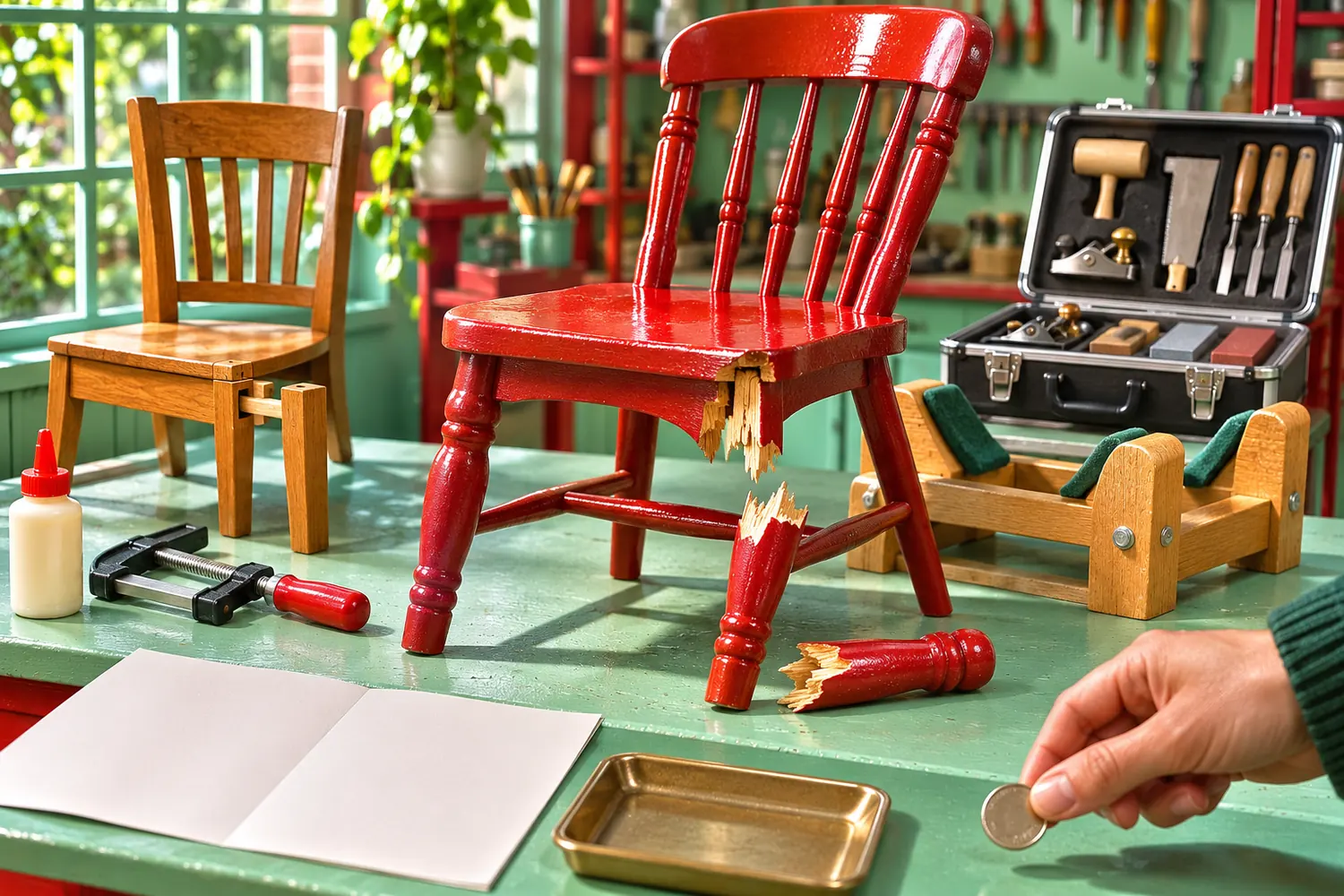
Augustin's own chair passes. Its joint is loose and easy to reach, and nothing has snapped.
The offer and action: what exactly am I agreeing to?
Bring the price, inclusions, schedule and terms together before the reservation button. A reader shouldn't have to assemble the offer from fragments scattered down the page.
For the exercise, Augustin settles the cancellation policy and writes the whole reservation block:
Join the live online workshop on November 14, from 10 a.m. to noon Eastern Time, for $65. You get the preparation guide and a recording available for thirty days; buy tools and materials separately.
Cancel by email at least 48 hours before the session for a full refund. Later cancellations aren't refunded. If we cancel the workshop, we'll refund your full payment.
Select "Reserve a place" to open checkout. Your $65 payment confirms your place, and we'll email the preparation guide with your session link.
Two ways to arrange the reservation details
Information spread across the page
- Price beside the first button.
- Tool costs hidden in a disclosure.
- Time zone shown only after payment.
A decision in one place
- Price and included materials beside the action.
- Required purchases stated before payment.
- Date and time zone repeated in the reservation summary.
That button opens payment for a confirmed place. If your own service needs an assessment first, write the assessment step into the offer and choose a label such as "Request a place." Explain when the reader will hear back and when payment becomes due.
How to Write Calls to Action helps you match the button and the details around it to the real next step.
Use the FAQ for remaining questions
Augustin moves "Can I watch later?" to the FAQ after the reservation block. The date and refund rule stay beside the button because they affect the booking itself.
For "Can I watch later?", repeat the access period directly: "The recording is available to participants for thirty days." Add any limits that affect viewing.
Read the page at two speeds
Nielsen Norman Group's inverted-pyramid article recommends putting the important information first and writing informative headings. It pictures the style as "a triangle balanced on a single point," which I find a handy image for a page and for each section inside it.
Someone scanning only the headings and the reservation block should follow the offer's argument. Augustin cuts the founder biography, the generic benefits grid and the separate tool gallery; the outcome and preparation sections already cover the useful details from the last two.
His final nine-section map puts eligibility early and keeps the booking terms together:
- Repair a loose chair joint. Identify the live beginner workshop, date and reservation action.
- Check whether your chair is suitable. Show eligible joints, excluded damage and when to ask before booking.
- See what you will practice. Name the repair plan and joint-checking tasks, with a sample checklist and the safety limit beside the outcome.
- Watch a sample instruction. Show the actual teaching angle and method so visitors can judge the instruction.
- Follow the workshop process. Explain the chair check, workspace preparation and live practice, including drying time beyond the session.
- Prepare these tools. List the equipment and workspace requirements, stating that tools and materials cost extra.
- See what's included. Describe the preparation guide, live instruction and thirty-day recording access.
- Reserve the November workshop. Bring together the date, time zone, $65 price, cancellation terms, payment step and reservation button.
- Questions about watching later? Repeat the recording access period and answer remaining viewing questions.
Someone reading the paragraphs should find the conditions and evidence behind each heading. On a phone, check the order after the layout stacks, because an eligibility note that lived in a desktop sidebar can drift below the purchase button.
Inspect the workshop page on a phone
Before the reservation form
- Locate the eligibility limits after the layout stacks. Check that they still appear before payment.
At the reservation form
- Compare the reservation summary with the offer above it. Resolve any differences in schedule or included materials.
When several decision questions need room, a long-form sales page can develop the argument without treating length as the goal.
Give every section a question
Choose an offer from your Landing Pages work and make a section map. Write the reader's question beside each proposed section, then note where its answer came from, whether that's a customer interview or an actual service term.
Circle any section that exists only because a competitor's page has one. If it doesn't answer a question the reader still has, remove it and check that the next section follows naturally.
With those three cuts made, Augustin types the date into the first screen. Then he turns the wobbly chair upside down on the bench and photographs its loose joint for the hero image.
Read next
Lesson 2 of 9 in Landing Pages
Sources & further reading
- The anatomy of a landing page
- Advertising FAQ's: A Guide for Small Business
- Inverted Pyramid: Writing for Comprehension
- Moz case study